5 Best Client-Side Building Mods for Minecraft (No Server Plugins)
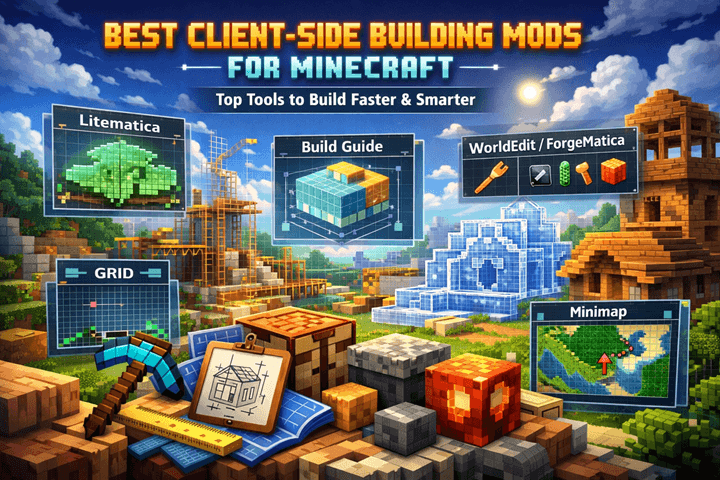
5 Essential Client-Side Building Mods for Minecraft 1.21
Let’s be real. Placing 10,000 blocks of Deepslate by hand isn’t “gameplay.” It’s a chore.
If you are trying to build a mega-base in Survival, or designing a complex Redstone contraption, the vanilla game works against you. You miscount one block, and suddenly your entire roof is off-center.
You don’t need Admin privileges or server plugins to fix this. You need Client-Side Mods. These are mods installed only on your computer that work on almost any server (SMPs, Realms, etc.).
Here are the 5 essential building mods for Minecraft 1.21 that will save you hundreds of hours.
1. The “Blueprint” King: Litematica
If you only install one mod, make it Litematica.
Litematica allows you to create “Schematics” (blueprints) of your builds in a Creative world, and then overlay a “ghost” version of that build into your Survival world. You see exactly where every block needs to go.
-
Why you need it: No more alt-tabbing to YouTube tutorials. You just fill in the ghost blocks.
-
Key Feature: The “Material List” tells you exactly how many stacks of stone, wood, and glass you need before you start building.
2. The New Creative Powerhouse: Axiom
WorldEdit used to be the king, but Axiom is coming for the crown in 1.21.
Axiom adds a “Builder Mode” to your inventory that lets you manipulate the world with Photoshop-like tools. You can paint terrain, smooth out mountains, and copy-paste structures instantly.
-
Note: Axiom is primarily for Creative Mode/Single Player. If you are on a server without the Axiom plugin, some features won’t work, but the client-side UI is still superior to standard Creative.
3. Survival Mirrors: Effortless Building
Building a massive cathedral? You usually have to build the left side, then painstakingly count blocks to replicate the right side.
Effortless Building fixes this with Mirrors and Arrays.
-
Mirrors: Place a block on the left, and the mod automatically places a “ghost” block on the right. (Note: On servers, you still have to click to confirm the placement, making it fair).
-
Arrays: Build a wall 100 blocks long by placing just the start and end blocks.
4. Technical Precision: Tweakeroo
Tweakeroo is the “Swiss Army Knife” for technical players. It has over 100 tweaks, but three are essential for builders:
-
Fast Block Placement: Removes the delay between placing blocks, allowing you to build walls instantly while running.
-
Flexible Placement: Place blocks in orientations that are normally impossible (like upside-down pistons) without moving your character.
-
Freecam: Fly your camera out of your body to check the back of your build without scaffolding.
5. The Visualizer: MiniHUD
Have you ever tried to build a perfect circle in Minecraft? It’s a nightmare. MiniHUD allows you to project “Overlay Shapes” into the world. You can spawn a visual sphere, circle, or cylinder to trace over.
-
Light Level Overlay: See exactly where mobs will spawn on your build (represented by red X’s) so you can light it up perfectly.
-
Strategic Bridge: If MiniHUD is too complicated to configure, just use our Browser-Based Circle Generator on your second monitor instead.
The “No-Mod” Alternative: Browser-Based Calculators
Mods are great, but they are heavy. Sometimes you don’t want to install Fabric API just to figure out how big a circle should be, or to calculate how much concrete you need for a wall.
For quick math without the lag, use browser-based tools. They run on a second monitor or your phone while you play.
-
For Circles & Shapes: Don’t guess the pixel art. Use a generator.
-
For Large Areas: Use our Block Area Calculator to instantly see how many stacks you need to fill a 50×50 floor.
-
For Shapes: Use our Minecraft Circle & Shape Generator (Coming Soon) to plot perfect curves.
-
Smelting Calculator: Figure out exactly how much coal you need to cook that glass.
-
Random Block Picker: Stuck on a color palette? Generate random blocks to get inspiration.
Strategic Note: Browser tools are safer for your FPS because they don’t add load to your Java instance.
Frequently Asked Questions
1.Are client-side mods allowed on servers?
Generally, yes. Mods like Litematica (without the printer function) and Sodium are allowed on 99% of servers, including Hypixel. However, always check your server’s rules regarding “Easy Place” or “Printer” modes, as these can trigger anti-cheat.
2.Do I need Fabric or Forge for 1.21?
For modern technical building, Fabric is the superior choice. Litematica, Sodium, and Axiom all run natively and faster on Fabric.
3.Can I use these on Bedrock Edition?
No. These are Java Edition mods. For Bedrock, you are limited to “Add-ons” from the Marketplace.
4.How do I install these mods?
-
Download the Fabric Loader for 1.21.
-
Download the Fabric API (mod) and place it in your
%appdata%/.minecraft/modsfolder. -
Download the
.jarfiles for the mods listed above and drag them into the same folder.